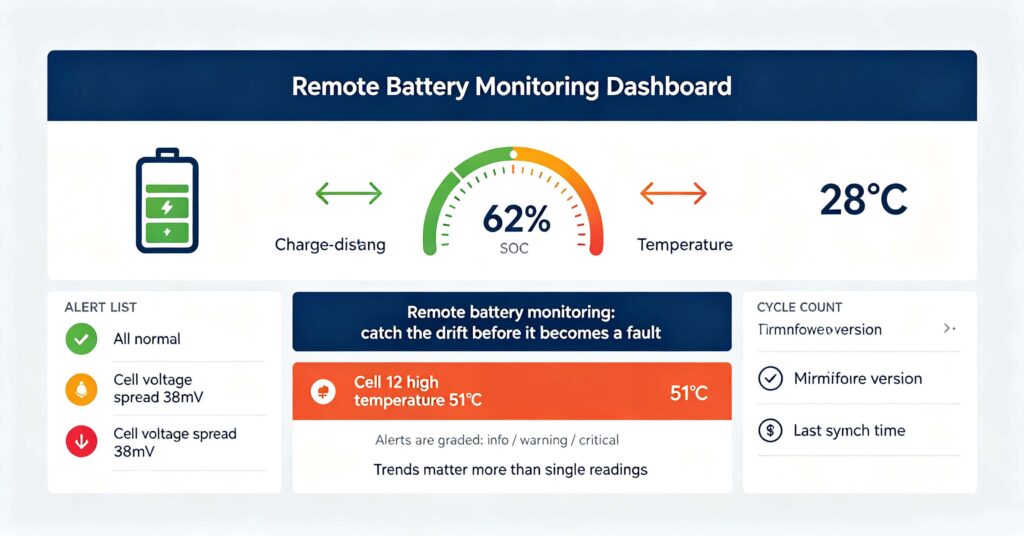
Remote battery monitoring is the practice of watching a battery’s state-of-charge, temperature, cell voltage spread, cycle count and fault flags through an app or web platform, without being on site, so problems are caught early instead of found at failure. The core metrics are: state of charge (SOC), cell voltage spread (the difference between highest and lowest cell — a growing spread is the earliest sign of imbalance), temperature (both average and per-cell), current and power, cycle count, and BMS fault flags. A good monitoring platform grades alerts into info, warning and critical: info for routine events, warning for values drifting toward limits (like cell spread growing), critical for immediate action (over-temperature, overvoltage, communication loss). Remote battery monitoring works over Wi-Fi, Ethernet or cellular through the battery’s BMS gateway, and the same channel also carries firmware updates — which should be applied on a schedule with the update notes reviewed, not at random. The value is in the trend: a single reading is noise, a drift over weeks is a signal, and that signal is what remote monitoring turns into an action.
Battery owners and operators increasingly manage storage from a phone or dashboard, and the discipline of what to watch makes the difference between early intervention and a field failure. This guide explains remote battery monitoring: the metrics, the alert levels, the firmware routine, and how to choose a platform. For the BMS-level parameters behind the dashboard, see #112 BMS monitoring: what to track.
The metrics that matter in remote battery monitoring
Dashboards can show dozens of values; a focused monitoring routine watches a handful. The table below lists them and what a change means.
| Metric | Healthy range / pattern | What a drift means |
|---|---|---|
| State of charge (SOC) | Cycles between expected limits per settings | Unusual swings may mean calibration or a weak cell |
| Cell voltage spread | Small (tens of mV) and stable | Growing spread = imbalance, earliest warning sign |
| Temperature | Within battery operating window | Rising cell temps = resistance or cooling issue |
| Current / power | Within continuous ratings | Repeated peaks may mean load or inverter issue |
| Cycle count | Tracks expected usage | Faster than expected = deeper cycling than planned |
| Fault flags | None active | Active flags need the BMS log reviewed |
Trends matter more than single readings. A one-time temperature spike on a hot afternoon is different from a weekly upward drift. Good remote battery monitoring platforms store history so you can see the trend, not just the snapshot. For the BMS parameters in depth, see #112 BMS monitoring again.
Alert levels and how to respond to each
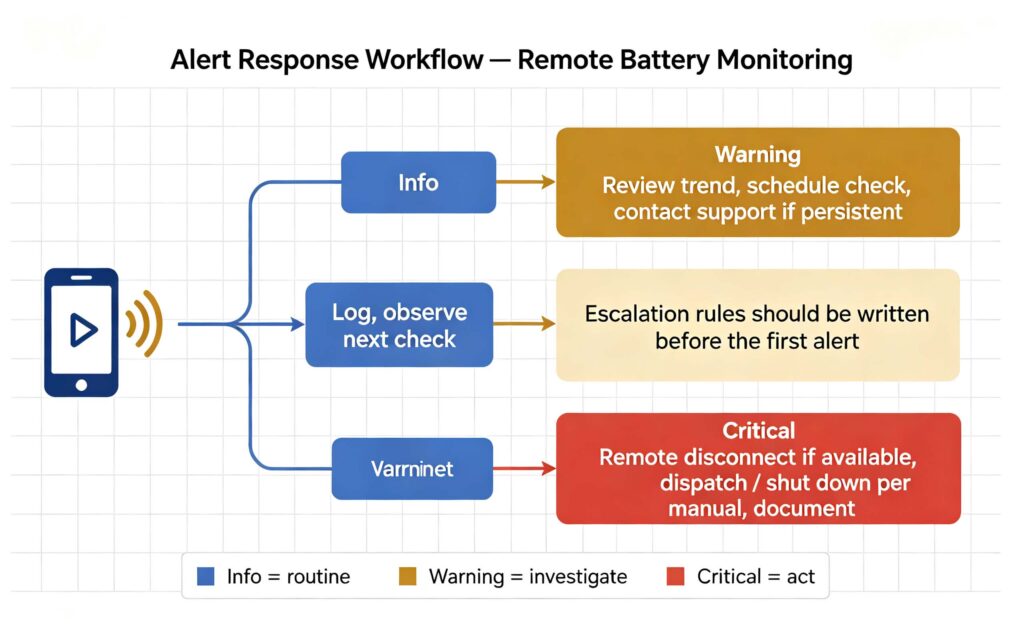
Alert fatigue is real: if every notification is urgent, none are. The discipline is to grade alerts and pre-write the response for each level.
Info — routine events like charge completion or scheduled events. Log and move on; only review if the pattern changes.
Warning — values drifting toward limits: growing cell spread, rising temperature trend, repeated current peaks. The response is investigation: review the trend, check whether anything changed (new load, weather, settings), and contact support if the drift persists over days.
Critical — over-temperature, overvoltage, communication loss, BMS protection trips. The response is action: follow the manufacturer’s manual — which may mean remote disconnect, dispatch, or shutdown — and document everything for the warranty claim if needed. Escalation rules should be written before the first alert, not improvised during one.
For the fault types these alerts reflect, see #108 common BMS faults and troubleshooting.
Firmware updates: the routine that keeps monitoring honest
Remote battery monitoring and firmware updates usually share the same channel — the BMS gateway — so the two practices go together.
Firmware updates fix bugs, change BMS behaviour, and sometimes improve measurement accuracy or add features. The safe routine: read the release notes, check the update’s compatibility with your inverter and monitoring platform, back up settings, apply the update during a low-activity window, and verify the system returns to normal (SOC reads correctly, communication restored, no new fault flags). Updates that change protection thresholds deserve extra care — the change can alter system behaviour in ways that only show up later. For the commissioning context where firmware is first set up, see #111 BESS commissioning.
Choosing a remote battery monitoring platform
Platforms range from the manufacturer’s own app to third-party BMS monitoring systems. The choice criteria: does it support your battery and BMS protocol; what metrics does it actually show (SOC only, or cell-level data); does it store history for trends; how are alerts delivered (app push, email, SMS); and who gets the data — the owner, the installer, the service company, or all three with different views.
For commercial and industrial systems, multi-tenant access matters: the owner wants finance-level summary, the installer wants commissioning data, the service team wants fault logs. If your platform cannot show that, remote battery monitoring degrades into a toy. For the manufacturer layer behind these platforms, see #83 battery monitoring system manufacturers.
Common questions installers and owners ask
Three questions recur in practice. Is remote monitoring worth it for a small system? Usually yes at the alert level — knowing a temperature or communication fault within minutes beats finding it at the next inspection. Can monitoring extend battery life? Indirectly: catching imbalance or temperature drift early prevents the deep degradation those conditions cause. Does monitoring replace maintenance? No — it targets maintenance: it tells you where to look, but physical checks, cleaning and connection retorque are still required. For the maintenance side, see #84 solar battery maintenance.
Q. What is remote battery monitoring?
It is watching a battery’s state of charge, temperature, cell voltage spread, cycle count and fault flags through an app or web platform without being on site. The value is catching drift early — a growing cell spread or rising temperature trend — before it becomes a failure. It works over Wi-Fi, Ethernet or cellular through the BMS gateway.
Q. What should I check in a battery monitoring dashboard?
Focus on SOC, cell voltage spread, temperature, current and power, cycle count and active fault flags. Trends matter more than single readings: a weekly upward drift in temperature or cell spread is the signal to investigate. Compare readings against the previous weeks, not just the day.
Q. How often should battery firmware be updated?
Apply updates on a schedule, reviewing release notes and compatibility with your inverter and monitoring platform first, and during a low-activity window. There is no universal interval — follow the manufacturer’s guidance. Updates that change protection thresholds deserve extra review, because they alter system behaviour that may only show up later.
Q. Do I need a monitoring platform or is the manufacturer app enough?
For a single home system, the manufacturer app is usually enough if it shows cell-level data and history, not just SOC. For commercial or multi-system operation, a platform with multi-tenant access, alert routing and stored history is worth it. The deciding factor is what the data is used for — awareness or management.
Q. Can remote monitoring replace battery maintenance?
No. It targets maintenance: alerts tell you where to look, but physical checks, cleaning, connection retorque and periodic inspections are still required. Monitoring and maintenance work together — monitoring finds the symptom early, maintenance addresses the cause, and the two together protect battery life.
Next step: decide what you will actually act on, then choose the platform
Remote battery monitoring pays when the alerts lead to actions: catch drift early, respond by written escalation rules, update firmware on a schedule, and give each stakeholder the view they need. Define your metrics and response levels before you pick a platform.
- Start with the BMS metrics in #112
- Learn the fault types in #108
- Pair it with maintenance in #84
- Ask leekooenergy for the monitoring package on your storage system: what metrics are exposed at cell level, how alerts are routed, who gets which view, and how firmware updates are delivered — so remote battery monitoring is a management tool, not a notification toy