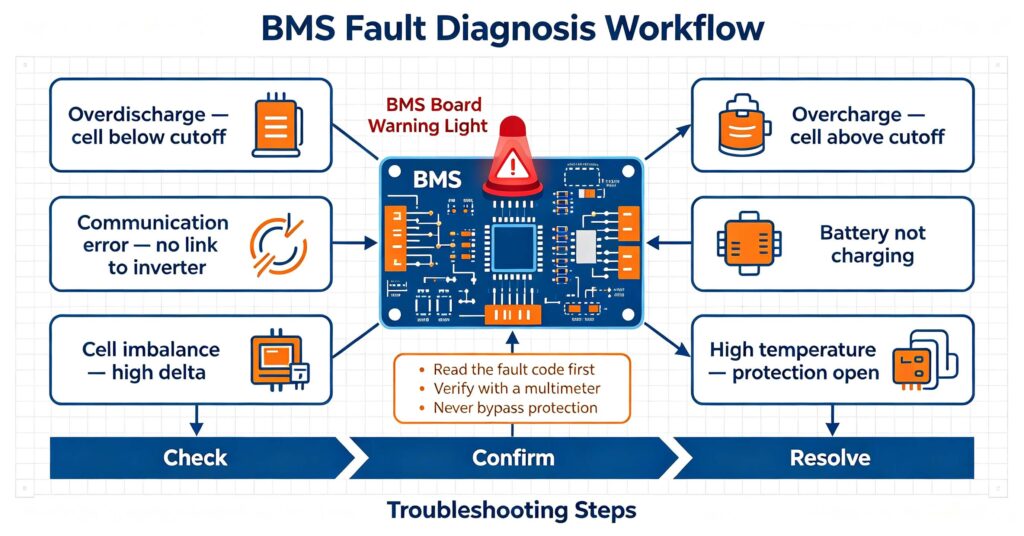
Common BMS faults in lithium battery packs are usually one of a small set of problems: overdischarge protection triggered (one cell fell below its low cutoff, often after deep discharge or imbalance), overcharge or cell-overvoltage protection (a cell exceeded its upper limit), a communication error between the BMS and the inverter or charger, the battery not charging or not turning on, excessive cell imbalance (a large voltage spread between cells), and high-temperature protection (the BMS opened the circuit because a cell got too hot). Most of these are protection events, not failures: the BMS is doing its job by opening the circuit, and the fix is usually to correct the trigger rather than replace the BMS. The troubleshooting sequence is the same for nearly every case: read the fault code or indicator first, confirm the actual cell voltages and temperature with a multimeter or the BMS app, identify which cell or parameter is out of range, correct the cause (recharge, balance, fix wiring or a bad cell), and let the BMS clear the protection. Only after confirming the cells and wiring are healthy should you consider a BMS replacement. This guide walks through each common BMS fault, how to diagnose it, and how to prevent it recurring. For the fundamentals of what a BMS does, see #28 battery management system 101.
When a battery “does not work”, it is most often the BMS protecting the pack from a real condition, not a dead board. Understanding the common BMS faults saves hours of diagnosis and prevents the two biggest mistakes: replacing a healthy BMS, or bypassing protection to force a charge. This field guide explains the six most common BMS faults, how to confirm each, and how to resolve them safely. For the protection functions themselves, see #49 BMS protection: overcharge, overdischarge and thermal.
Overdischarge protection: the most common BMS fault
Overdischarge protection is the single most common BMS fault on field returns. It happens when one or more cells fall below the low-voltage cutoff (typically around 2.5V per cell for LiFePO4), so the BMS opens the discharge path to protect the cells. The battery appears “dead” — no output voltage.
Why it happens: a pack left idle and self-discharged below cutoff, a load left connected after the system was turned off, imbalance where one weak cell hits cutoff while the rest are fine, or a deeply drained pack stored for a long time. Diagnosis: measure the pack and per-cell voltages with a multimeter. If cells are near their normal range but the pack reads low or zero, the BMS protection is the cause. The fix is usually a slow recharge (or a low-current “wake-up” charge if the pack is very low), which clears the protection once cells rise above the recovery threshold. See #32 how to choose a LiFePO4 BMS for cutoff values to check.
Overcharge and cell-overvoltage protection
Overcharge protection trips when a cell exceeds its upper voltage limit (around 3.65V per cell for LiFePO4). The BMS opens the charge path, so the battery stops accepting a charge — it looks like “won’t charge” or “stops at a fixed percentage”.
Causes include an incompatible charger set to the wrong voltage, a charger that over-serves the pack, or a pack whose cells are imbalanced so one cell overvolts before the pack is full. Diagnosis: read the cell voltages during charging. If one cell hits 3.65V while others are at 3.4V, the pack is imbalanced and the BMS is protecting the high cell. The fix is to let the BMS balance (or actively balance) so cells even out, and to confirm the charger voltage matches the pack. If the charger is wrong, correct it before returning to normal use.
Communication errors between BMS and inverter
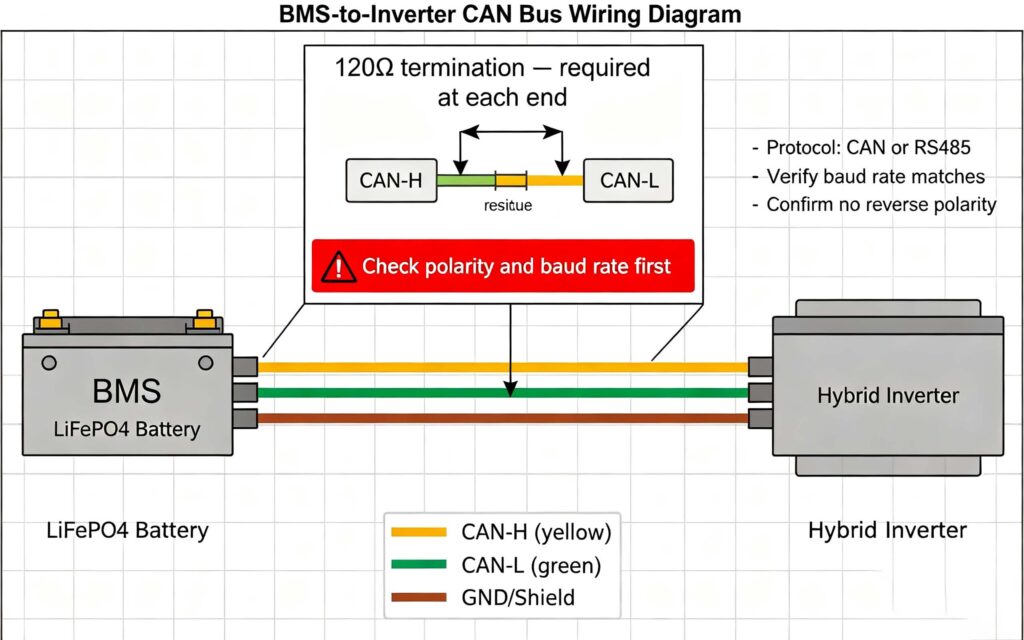
Communication errors are common on BMS-inverter setups. The inverter cannot see the battery, reports a communication fault, or shows the wrong state of charge. The BMS and inverter must agree on a protocol (CAN or RS485) and matching parameters.
Causes: a loose or reversed CAN/RS485 cable, wrong baud rate or protocol setting, a missing or incorrect terminator, an address mismatch, or a protocol version incompatibility. Diagnosis: check the wiring and termination first, then the protocol and baud settings on both devices, then the BMS’s communication indicator. Many communication faults are wiring or settings, not hardware. For the protocol details, see #18 battery-inverter compatibility: CAN and RS485.
Battery not charging and high-temperature protection
“Battery not charging” usually traces to one of the protection faults above, a communication issue, or a temperature block. High-temperature protection is its own common cause: the BMS opens the charge or discharge path when a cell exceeds its temperature limit (commonly 45-55°C depending on the BMS and chemistry).
For “not charging”: check the charger is producing output, confirm the BMS is not in overvoltage or low-temperature protection, verify communication, and check for a pre-charge or inrush condition that a weak charger cannot handle. For high temperature: the cause is usually ambient heat, high charge/discharge rate, or a pack placed in a poorly ventilated enclosure. The fix is cooling and reducing the rate; the BMS clears automatically once temperature drops into range. Repeated high-temperature trips on a new system point to a sizing or ventilation problem, not a BMS defect.
Cell imbalance and the BMS balancing limit
Cell imbalance is a slowly developing condition, not a sudden fault, but it is behind many “common BMS faults” because it triggers overcharge or overdischarge protection. When cells drift apart, one cell hits a cutoff while the pack is not full or not empty.
Imbalance causes: mismatched cells from the start, uneven aging from temperature gradients, repeated high-rate use, or a balancing current too small for the drift. Diagnosis: compare the highest and lowest cell voltages at rest and during charge. A healthy LiFePO4 pack should hold a delta of tens of millivolts; a delta above roughly 100-200mV is significant. The fix is to let the BMS balance (which needs time and a charge near the top), and if imbalance keeps returning, check for a weak cell. For the balancing methods, see #106 active vs passive cell balancing.
Preventing common BMS faults
Most BMS faults are preventable with the right setup and habits.
- Never bypass protection: forcing a charge past overvoltage, or shorting the discharge to “reset” a BMS, damages cells and can be dangerous. Clear the cause, not the protection.
- Set the charger correctly: match charger voltage, current and protocol to the pack and BMS. The single largest cause of charge-side faults is a wrong charger.
- Keep cells balanced: let the BMS balance by charging fully periodically, and store packs charged rather than fully drained.
- Manage temperature: install the battery in a ventilated, conditioned space and size the charge/discharge rate within the BMS limits.
- Verify wiring: check polarity, termination and seating of communication and power cables during installation and after any service.
When a fault does appear, follow the sequence: read the code, confirm with measurements, correct the cause, then let the BMS clear. Only replace the BMS after confirming cells and wiring are healthy. For the remote-monitoring side of keeping packs healthy, see #83 battery monitoring system manufacturers.
Q. Why is my BMS not letting the battery charge?
Usually the BMS is protecting the pack from a real condition. The most common causes are overvoltage protection (a cell or charger above the limit), low-temperature protection (below the charge cutoff), or a communication fault where the charger does not see the BMS. Check the charger output, the cell voltages, and the temperature, then confirm the BMS and charger agree on protocol. Correct the cause and the BMS clears automatically.
Q. How do I know if my BMS is faulty or just protecting the battery?
Measure the cell voltages and temperature with a multimeter or the BMS app. If one cell is below the low cutoff or above the high cutoff, or a cell is hot, the BMS is protecting the pack and is working correctly. If all cells and temperatures are normal but the BMS still refuses to charge or discharge, suspect a communication, wiring or genuine BMS fault. Never bypass protection to test.
Q. Can I reset a BMS by disconnecting the battery?
A power-cycle reset can clear a latched protection or a communication lock-up, and it is safe if done properly: disconnect the load and charge sources, let the pack rest, then reconnect. But if the BMS is protecting against a real condition like overdischarge or overvoltage, a reset will not fix it and the protection will return. Always correct the underlying cause rather than relying on resets.
Q. What causes cell imbalance in a LiFePO4 pack?
Imbalance comes from cells that start slightly different in capacity, resistance or self-discharge, and from conditions that make differences grow: temperature gradients across the pack, repeated high-rate charging or discharging, and partial charge cycles that give the BMS little chance to balance. A weak or damaged cell can also cause persistent imbalance. Balancing during a full charge reduces the delta, but a cell that keeps drifting likely needs replacement.
Q. Should I replace a BMS after a protection trip?
Not usually. A protection trip means the BMS detected a condition and acted correctly; replacing it does not fix the underlying cause. Diagnose first: confirm the cell voltages, temperature and wiring, correct the trigger, and let the BMS clear. Replace the BMS only if it is genuinely defective — for example, it refuses to work when all parameters are healthy, or it has physical damage. Bypassing protection to “fix” it is unsafe.
Next step: get support that diagnoses the cause, not just the symptom
Understanding common BMS faults helps you fix batteries faster and avoid replacing healthy parts. Almost every field return is a protection event with a correctable cause: overdischarge, overvoltage, communication, temperature or imbalance. Diagnose with measurements, correct the trigger, and let the BMS clear protection before considering a replacement.
- Refresh BMS fundamentals in #28
- Check communication setup in #18
- Review BMS protection functions in #49
- Ask leekooenergy for a BMS troubleshooting and support package that includes: guidance on reading fault codes and indicators for your battery model, the correct cell voltage and temperature cutoffs for your LiFePO4 pack, wiring and protocol setup for your inverter, recommended balancing procedure, and a clear path to technical support — so you can diagnose and resolve common BMS faults quickly, without bypassing safety or replacing healthy parts