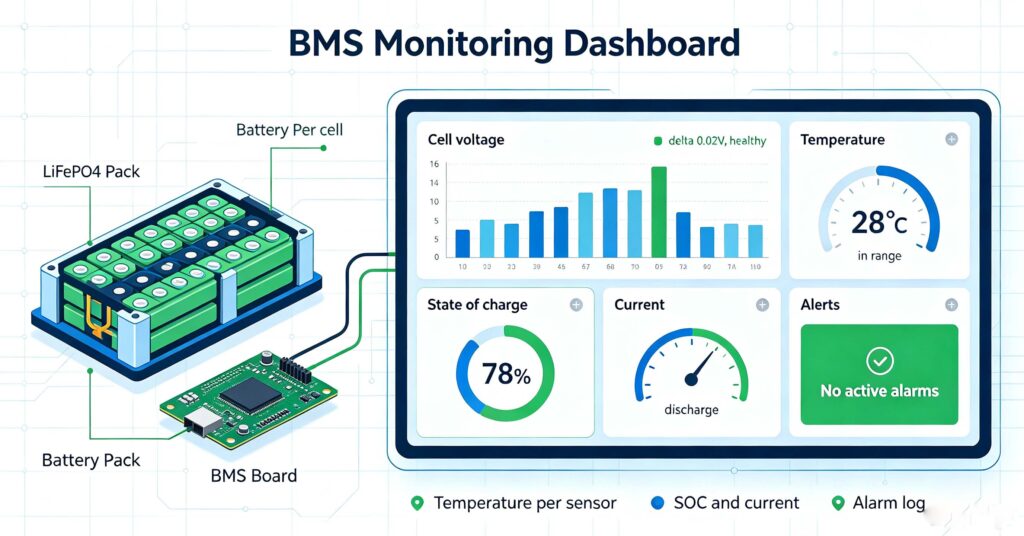
BMS monitoring is the continuous measurement and reporting of the key parameters of a lithium battery — cell voltage, cell temperature, pack current, state of charge, state of health and alarms — by the battery management system, so that the battery stays within safe limits and its health is visible over time. A BMS monitors, per cell, the voltage (to catch imbalance, overvoltage and under-voltage), and per sensor, the temperature (to catch hot spots and over-temperature); it tracks pack current to enforce charge/discharge limits, estimates state of charge (SOC) and state of health (SOH), and logs alarms and protection events. Monitoring can be viewed locally (on the BMS display or a connected screen), through a mobile app (Bluetooth or Wi-Fi for home batteries), or through a cloud platform (for commercial fleets and remote management). BMS monitoring matters because it turns hidden battery conditions into visible data: it catches a drifting cell before it triggers a protection event, flags overheating before damage, tracks whether the pack is aging as expected, and gives installers and operators the evidence to diagnose faults instead of guessing. Good BMS monitoring is the difference between a battery you manage and a battery you discover problems on too late. For the overall role of a BMS, see #28 battery management system 101.
Every lithium battery has a BMS protecting it, but not every BMS gives you visibility into what it is doing. BMS monitoring is the layer that turns protection into insight: knowing each cell’s voltage, the temperature, the state of charge and the alarm history. This guide explains what a BMS monitors, how to view it, and why monitoring matters for battery life, safety and operations. For the commercial side of monitoring products, see #83 battery monitoring system manufacturers.
What a BMS monitors
A BMS monitoring function tracks the parameters that determine whether a battery is safe and healthy. These are measured continuously and reported to the display, app or cloud.
Cell voltage: the BMS reads every cell’s voltage, usually many times a second. This detects overvoltage (a cell above its limit), under-voltage, and cell-to-cell imbalance. The delta between the highest and lowest cell is a key health signal: a healthy LiFePO4 pack holds it to tens of millivolts.
Cell temperature: temperature sensors at several points detect hot spots and enforce the charging/discharging temperature window. Over-temperature protection opens the circuit; monitoring shows when and where it happens.
Pack current and charge/discharge limits: the BMS measures the current and enforces overcurrent and short-circuit protection. Monitoring shows the actual charge/discharge rate against the rated limit.
State of charge (SOC) and state of health (SOH): the BMS estimates how full the battery is and, over time, how much capacity it has lost. Monitoring SOH over months reveals aging and flags a battery approaching replacement. See #51 when to replace your battery for how SOH guides the decision.
Alarms and events: the BMS logs every protection trip and alarm with a timestamp, which is the evidence base for diagnosing problems.
How to view BMS monitoring: local, app and cloud
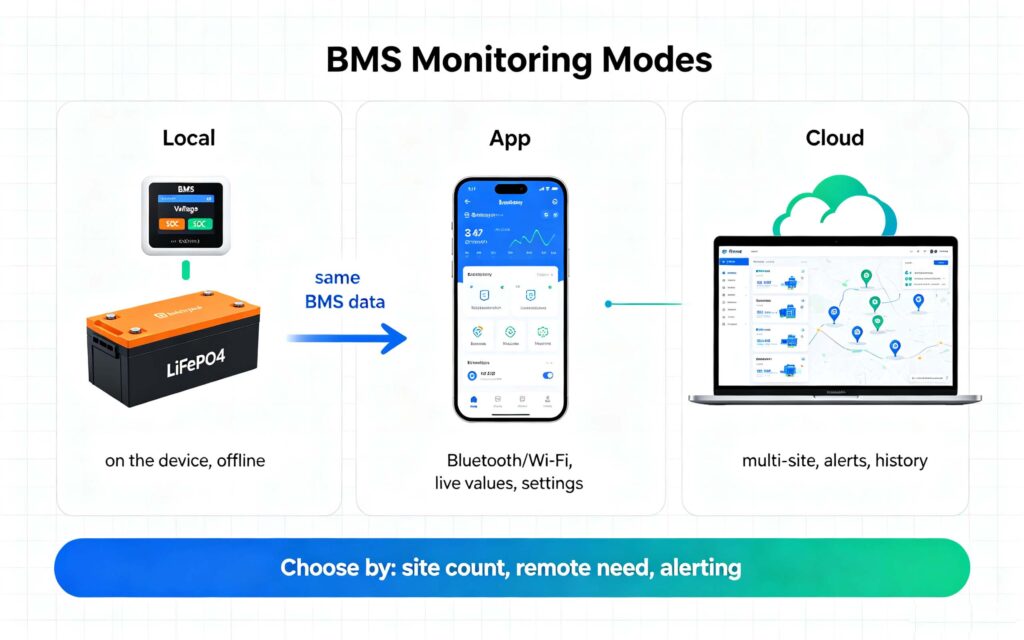
The same BMS data can be presented in different ways depending on the product and use case.
Local display: the BMS or the system shows key values (voltage, SOC, temperature) on a screen. This is simple and works offline, but gives no history and no remote access.
Mobile app (Bluetooth/Wi-Fi): most home batteries and many small commercial systems pair with an app over Bluetooth or Wi-Fi. The app shows live voltage, temperature, SOC, and lets you change some settings and see recent events. This is the most common BMS monitoring interface for residential and small systems.
Cloud platform: for commercial fleets, multi-site systems, and remote management, the BMS pushes data to a cloud platform. Operators see all sites on one dashboard, get alerts, and can review history and performance. Cloud monitoring is how installers and operators manage many batteries at once.
Why BMS monitoring matters
Monitoring turns a protected battery into a managed one. Its value shows up in safety, life, uptime and diagnosis.
Safety: monitoring catches overheating and voltage anomalies early, before they become a protection trip or a thermal event. Seeing a cell drift is far better than discovering it when the BMS opens the circuit.
Battery life: by watching temperature, charge rate and imbalance, operators avoid the conditions that degrade cells — repeated over-temperature, over-charging past imbalance, and deep over-discharge. Monitoring supports the practices that extend cycle life. For a fuller look at life and degradation, see #69 how long does a lithium-ion battery last.
Uptime and diagnosis: a cloud or app alert tells an operator about a problem immediately, often before the user notices. And because the BMS logs events with values, diagnosing a fault becomes a matter of reading the record rather than guessing. For the fault side, see #108 common BMS faults and troubleshooting.
Choosing a BMS monitoring setup
Choose the monitoring level that matches the use case. For a single home battery, an app over Bluetooth/Wi-Fi is usually enough; for a commercial or multi-site system, cloud monitoring is the practical choice.
- Single residential battery: a Bluetooth/Wi-Fi app that shows voltage, SOC, temperature and recent events is sufficient. No cloud subscription needed.
- Small commercial system: consider app plus optional cloud for alerts, especially if the site is remote or you need history.
- Multi-site or fleet: choose cloud monitoring with a dashboard, alerting and history across all sites. This is what installers and operators need to manage many batteries.
- Critical or high-rate systems: choose BMS monitoring with configurable alerts and thresholds, so you are notified before a limit is reached, not after a trip.
Confirm that the BMS you choose actually exposes the data you need, in the interface you can use, before buying — monitoring that cannot be read is protection without visibility. For integrating monitoring into a full system and tracking health over time, see #84 solar battery maintenance.
Q. What does a BMS monitor in a battery?
A BMS monitors cell voltage (each cell, catching imbalance, overvoltage and under-voltage), cell temperature (per sensor, catching hot spots), pack current (enforcing charge/discharge limits), state of charge, state of health, and it logs alarms and protection events. These are measured continuously and shown on a display, app or cloud platform. Monitoring these parameters is what lets the BMS protect the pack and lets you see its health.
Q. Is BMS monitoring the same as a battery management system?
No. The BMS is the protection and control hardware that measures parameters and opens circuits to protect the battery. BMS monitoring is the visibility layer that reports those measurements to you — through a display, app or cloud. A battery always has a BMS, but it does not always expose monitoring. Good monitoring shows you the voltage, temperature, SOC and alerts so you can manage the battery, not just be protected by it.
Q. Can I monitor my battery remotely?
Yes, with a BMS that supports it. Home batteries typically use a Bluetooth or Wi-Fi app for live values and settings within range. Commercial and multi-site systems use a cloud platform that pushes data over the internet, so operators can see all sites on one dashboard, receive alerts, and review history from anywhere. Choose the mode that matches your number of sites and remote-management need.
Q. What is the difference between SOC and SOH in BMS monitoring?
State of charge (SOC) is how full the battery is right now, shown as a percentage. State of health (SOH) is how much capacity the battery has retained compared with new, reflecting degradation over time. Both are shown by good BMS monitoring: SOC tells you energy available now; SOH tells you when the battery is aging and nearing replacement. Tracking SOH over months reveals aging trends.
Q. How does BMS monitoring prevent battery failures?
By making problems visible before they cause a failure. Monitoring catches a drifting cell voltage, a rising temperature, or a repeated protection event early, so you can correct the cause before damage or an outage. Alerts tell you immediately when something is wrong, and the event log gives the evidence to diagnose it. Monitoring does not replace protection; it lets you act on the information protection creates.
Next step: choose BMS monitoring that gives you real visibility
BMS monitoring is the layer that turns a protected battery into a managed one. Track cell voltage, temperature, current, SOC and alarms — locally, by app or through the cloud — so you catch drift, overheating and aging early. Match the monitoring level to your site count and remote need, and confirm the BMS exposes the data you can actually use.
- Understand the BMS itself in #28
- Evaluate monitoring products in #83
- Diagnose what monitoring reveals in #108
- Ask leekooenergy for a BMS monitoring specification that includes: the parameters your battery BMS monitors and exposes, the interface (display, Bluetooth/Wi-Fi app or cloud platform) for your use case, alert and threshold configurability, remote monitoring capability for your number of sites, and how monitoring data supports maintenance and diagnosis — so your battery’s health is visible and manageable, not hidden until a problem appears